Can't find what you're looking for? Please feel free to contact us.
General Information
Where can I find the latest information about the conference?
All updates can be found on our Conference website (tab News), conference app, as well as on our social media. Please follow us on Facebook and Twitter!
Can I post about the conference on my social media?
Yes, you can! If you do so, please be mindful and use the hashtag #MSABuenosAires2026.
Does the conference have an online or hybrid component?
No. The MSA 2026 Buenos Aires conference is organised in a fully on-site format. Online participation is not possible.
What is the language of the conference?
The MSA is committed to transdisciplinarity, cross-regional understanding, and inclusivity. To enable academic exchange across disciplines and regions, this conference will be bilingual (in English and Spanish), including panels that use both languages. All plenary sessions will be interpreted by professional translators. To ensure that all other sessions are as inclusive as possible, we are working on strategies to facilitate bilingualism.
Abstracts must be submitted in English to ensure a fair and efficient review process. However, authors are welcome to provide an additional version of their paper in Spanish.
Where can I find the conference programme?
You can find the conference programme here.
What is MSA Forward?
MSA Forward is a pre-conference workshop for postgraduate (PhD) researchers to present their work in a constructive environment, allowing them to engage with other scholars in their field and to receive feedback from established academics. Please note the MSA Forward is for pre-selected applicants only.
Will accommodation be provided by the organisers?
Delegates are required to organise their own travel and accommodation in Buenos Aires. More details will be available on our Conference website.
Will I be able to use a PowerPoint presentation and some other tools?
Yes, all participants will be able to show a PowerPoint presentation. There will be facilities for PowerPoint (including computers, screens, and speakers) in all of the conference rooms. However, if you have any additional technical requirements, please do let us know.
All PowerPoint presentations must be prepared in English; however, bilingual presentations (English and Spanish) are strongly encouraged.
What about time zones?
All times and dates are given in Argentina Standard Time GMT-3.
Will there be a publication following the conference?
No, there will not be a publication after the conference. We appreciate your interest, but no post-conference proceedings or volumes are planned.
Are there any facilities for delegates travelling with children?
Yes, a university room will be available, equipped with a microwave, refrigerator, changing mats, and a breastfeeding-friendly area. Please note that children remain the full responsibility of their parents or guardians at all times.
Who is a non-presenting participant?
A non-presenting participant is a person registered for the conference who does not present their work during the event. They can still attend and listen to all panels, ask questions, join discussions, and take part in side events.
Registration & MSA membership
How much is the conference fee?
Information about the conference fee is available on the conference website. Please note that to participate in the conference, you must be a member of the MSA. Find out more about being an MSA member here.
Why do I have to pay both for the registration and for the MSA membership?
According to the MSA rules, all presenters at MSA conferences have to be MSA members in good standing. Only through the membership fees is the existence of MSA sustainable. They are used to fund all the activities you see advertised on our webpages, such as the daily operations of the MSA and key initiatives such as the MSA Scholars at Risk program or subsidies for Working Groups' events. These contributions enable us to sustain and expand our activities, fostering collaboration, scholarly exchange, and the protection of academic freedom within our community. Please note that most of our work is unpaid, and we contribute our time voluntarily to keep MSA operating.
Thank you for your understanding and continued support.
How can I become an MSA member?
To read more about becoming an MSA member, please visit MSA's website.
When is the registration deadline?
All presenters must be registered by April 12, 2026.
I've heard about a free MSA membership for scholars residing in Argentina. How can I apply for it?
Eligible conference participants based in Argentina are entitled to a cost-free MSA membership for a period of twelve months. To apply, you must first complete your conference registration via the conference registration system.
We kindly ask applicants to wait for these instructions, which will be sent soon, before contacting the MSA office.
I can no longer attend the Conference. Can I get a refund of my Conference registration fee?
All conference fees are non-refundable. This policy is necessary as, once registered, the associated costs for venues, services, and other arrangements remain fully charged to MSA Buenos Aires, even if an individual withdraws for personal, professional, or travel-related reasons. We appreciate your understanding and cooperation in this matter.
Can my institution pay for my tickets through an invoice?
Due to the high number of participants and difficulties in processing such payments, we ask that all delegates register through the system. However, if this is not possible, please contact us.
How can I receive a letter of invitation?
To receive a Letter of invitation, please contact us. We will ask you to fill in a form. Please bear in mind that all data provided there (name, surname, affiliation, email address, etc.) must be identical to that entered upon proposal submission.
Are there any funding or grant options available?
All conference grant funds for MSA Buenos Aires 2026 have now been fully distributed. With over 300 applications and limited funding available, the selection process was highly competitive, and our committee faced very difficult decisions. Grants were awarded to those applicants assessed as having the greatest financial need. If you have not yet received information about your application outcome, please contact us at buenosairesconference@memorystudiesassociation.org
for an update.
I need an invoice for the registration fee. Where can I find it?
You can export an invoice for the conference fee in your profile. Go to  , click on
  , and then choose your order and click on the chosen option
To receive an invoice for the membership fee, please contact info@memorystudiesassociation.org.
Conference Program
| Tue 28.07. | Weds 29.07. | Thu 30.07. | Fri 31.07. | Sat 1.08. | Sun 2.08. | |
| Preconference | Day 1 | Day 2 | Day 3 | Postconference | Postconference | |
| Registration: 10:30 - 17:30 | Registration: 8:30-20:00 | Registration 8:30-20:00 | Registration 8:30 -14:00 | Cultural program events | Activity organised by the Museum of Modern Art (post-conference) | |
| 9:00 - 10:30 | WHOLE DAY: MSA Forward pre-events | Semi-plenary session | Semi-plenary session | Semi-plenary session | Trip to Vesubio | |
| Semi-plenary session | Semi-plenary session | Semi-plenary session | ||||
| 10:30-11:00 | Coffee Break | |||||
| 11:00 - 12:30 | 10:00-11:30 Research Center Meeting | Panel Sessions 1 | Panel Sessions 5 | Panel Sessions 8 | ||
| Cultural program event | Cultural program event | Cultural program event | ||||
| Cultural program event | ||||||
| 12:30 - 14:00 | LUNCH | |||||
13:00-14:00 | MSA event | Member's Meeting | MSA event | |||
| Cultural program event | Cultural program event | Cultural program event | ||||
| 14:00-15:30 | WG/RG Meetings | Panel Sessions 2 | Panel Sessions 6 | Panel Sessions 9 | ||
| 15:30-15:45 | Coffee Break | |||||
| 15:45-17:15 | Cultural program event | Panel Sessions 3 | Panel Sessions 7 | Panel Sessions 10 | ||
| Cultural program event | Cultural program event | Cultural program event | ||||
| 17:15-17:30 | Coffee Break | |||||
| 17:30/18:00 -19:00 | Inauguration - Plenary Session | Panel Sessions 4 | Plenary session | Panel Sessions 11 | ||
| 19:15-20:15 | Reception Dinner (Gym DI Tella) | 19:30-20:30 Book Raffle | Cultural program event | |||
How can I find my panel?
1. To search for your panel, type your name or the panel title into the search bar. If you have trouble finding your panel, please type in the search bar only one or two words from the title and search again

2. You can click the  icon for a more advanced search.
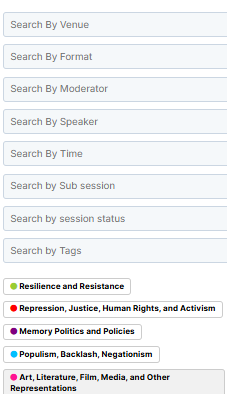
3. The panels you are speaking at are also visible on the bar above the session's name and in the profile menu
3.1 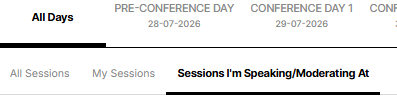
3.2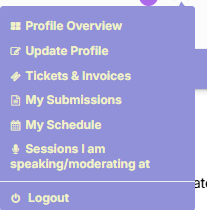
What is the difference between My Sessions and Sessions I'm Speaking/Moderating At?
My Sessions are sessions added to your schedule, and Sessions I'm Speaking/Moderating At display the panels in which you are presenting personally.
I want to add panels to my schedule. How to do it? Where can I see it?
To add panels to your schedule, click the blue "Add this Session to my Schedule" button (in the form of a heart) next to the title of the panel. To visit your personalised schedule, go to Profile overview and click on My Schedule.
I am interested in Working & Regional Groups panels/Special events/Cultural program/Specific topics. How do I find them?
Go to Advanced filters
 and pick the event track you are interested in.
Why am I added as a chair/moderator to a panel?
Participants marked as Primary Authors during the submission process were assigned the role of a chair for a given panel.
I submitted an Individual Paper. How can I see what panel I am in?
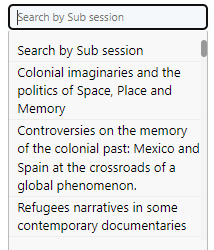
Go to Advanced filters and pick the title of your paper in Search by Subsession
Why is there another speaker on my panel?
Some Individual Papers were added to pre-formed panels so that everyone has the opportunity to present their paper. We were trying our best to match papers with the most suitable panels.
I cannot see all the panels. What's wrong?
Please make sure you delete the previous search and try again.
How can I see who is chairing the panel?
Click on the title of the panel you are interested in, and then click on "Moderators" on the right side.
I do not see the full program. What should I do?
You can try a few things:
Refresh the page.
Click on a different page and then click back on the day you are interested in.
Check if you RESET your previous searches.
If you typed in the title of a panel and it does not pop up, try searching for it only by using one word or a short phrase from the title.
Can I print the program?
Yes, to do so, click on the printer icon in the upper right corner of the screen:

How long is my presentation supposed to be?
Presentations should be a maximum of 15 minutes. Please respect that limit or any other instructions provided by your panel chair so that everyone on the panel has equal time to present.
Conference App
What is the Dryfta Mobile App?
The Dryfta Mobile App is the mobile version of the conference website. It provides access to the conference programme and many additional features, allowing you to manage your conference schedule directly from your phone.
Where can I download the app?
Android (Google Play):
https://play.google.com/store/apps/details?id=com.dryfta
iPhone (App Store):
https://apps.apple.com/us/app/dryfta/id1239665320
What can I do with the app?
The app allows you to:
- Receive instant notifications about schedule or venue changes
- Browse the full conference programme
- Search for attendees, their profiles, abstracts, and sessions
- Update your profile and add a profile photo
- Create your own personal conference schedule
- View speakers and moderators for each session
- Access venue information, travel information, and the conference FAQ
How do I log in?
- Download the Dryfta Mobile App from the App Store or Google Play.
- Search for "MSA Buenos Aires 2026".
- Select the conference to add it to your app.
- Log in using the same email address and password you use for the conference website (Dryfta).
Once you log in, the conference home page will appear.
What can I find in "My Account"?

Tap the account icon in the upper-right corner to:
- View your personal schedule
- See the sessions you have added
- Update your profile
- Upload or change your profile photo
What do the menu tabs mean?
 Home
Home
Provides quick access to conference information and announcements.
 Program
Browse the complete conference programme.
You can:
- Search by session title
- Search by speaker or moderator
- Open session details
- Add sessions to your personal schedule
 Speakers
Browse speaker profiles and biographies.
 More
More
Find additional conference information, including:
- Sponsors
- Selected content from the conference website
- FAQ
Can I use the app without an internet connection?
Yes. Once the conference has been downloaded to your device, you can browse the programme and most conference information offline.
How can I add a session to my schedule?
Click the plus icon next to the session title.
What are the Quick Links on the home page?
The Quick Links provide direct access to some of the most important sections of the conference website, allowing you to find key information quickly.
Is the app available in Spanish?
No. Unfortunately, the app is currently available only in English.
I don't see my presentation in the app. What happened?
If your paper was added to a pre-formed panel, it will not appear as a separate session in the programme.
To find it:
- Open your session by clicking on the session title.
- Select "Presentations in this program"
Your paper will be listed there.
Please note that the presentation timings displayed in this section are generated automatically by the system and are not accurate. Please refer to the main session time in the conference programme.
Mobility
What should I do if I have mobility needs?
If you have mobility needs or require accessibility support, please contact the conference organisers in advance. We will do our best to accommodate your requirements and provide information about accessible facilities.
Is the venue accessible for people with mobility impairments?
Yes. The venue is wheelchair accessible and includes step-free access to the main conference areas. If you have specific accessibility questions, please contact the organisers before the event. Some events will take place at other venues, most of them within walking distance (we will provide detailed information with the final program). Clear indications will be provided, so we assume that most participants will be able to find their way. Only if you have any health-related mobility needs should you fill out this form by 15 June at the latest, so we can organise a shuttle service.
Can I reserve accessible seating?
Yes. If you require accessible seating or space for a mobility device, please let us know before the conference so we can make the necessary arrangements.
Are elevators available?
Yes. Elevators provide access to all conference floors that are part of the event. Venue staff and volunteers will be available to assist if needed.
Can I bring a mobility aid or service animal?
Yes. Participants are welcome to use wheelchairs, walkers, scooters, or other mobility aids. Service animals are also permitted in accordance with the venue's policies. The venue (Universidad Di Tella) needs to know in advance if any visitors will require a service animal. Please send an email to msa2026@utdt.edu if you will be accompanied by one.
Who can I contact if I need assistance during the conference?
Conference staff and volunteers will be available throughout the event. You can also visit the registration desk for assistance or directions.
What should I do if I need additional accommodations?
Please contact the conference organisers as early as possible with your request. While we cannot guarantee every accommodation, we will make every reasonable effort to support your participation.
Using the Conference Website
I forgot the password to my account. What should I do?
Click on "Login" in the main menu, and then click on "Forgot your password?"
I want to change the password. How can I do that?
Go to My Dashboard and click "Change Password" below your picture.
How do I add/change my photo?
To update your profile picture, go to My Profile. Hover your mouse over the picture and click "Browse".
How should I add/correct my affiliation?
Go to My Profile and scroll down to the form with your personal information. Make the changes and click "Update Profile" at the bottom of the page.
Website & technical requirements
What is Dryfta?
Dryfta is an event management software that we use to organise the conference. While registering for the event, you are also creating an account on the website where you will be able to see the programme and connect with other participants.
I am having trouble logging in. What should I do?
Please check which email address you used to create your account. If you have forgotten your password, you can use the reset password function.
If you still cannot log in and have tried using a different browser, please contact the Dryfta technical support team: support@dryfta.com.
What should I do if I have other questions?
As our organising team is international, we kindly ask that all communication with us be conducted in English. This helps ensure that your message can be properly understood and addressed by all members of the team. We appreciate your understanding and cooperation.
- With questions regarding the conference, please contact us at buenosairesconference@memorystudiesassociation.org
- For MSA-related matters (including membership fees), please contact info@memorystudiesassociation.org.